Backups
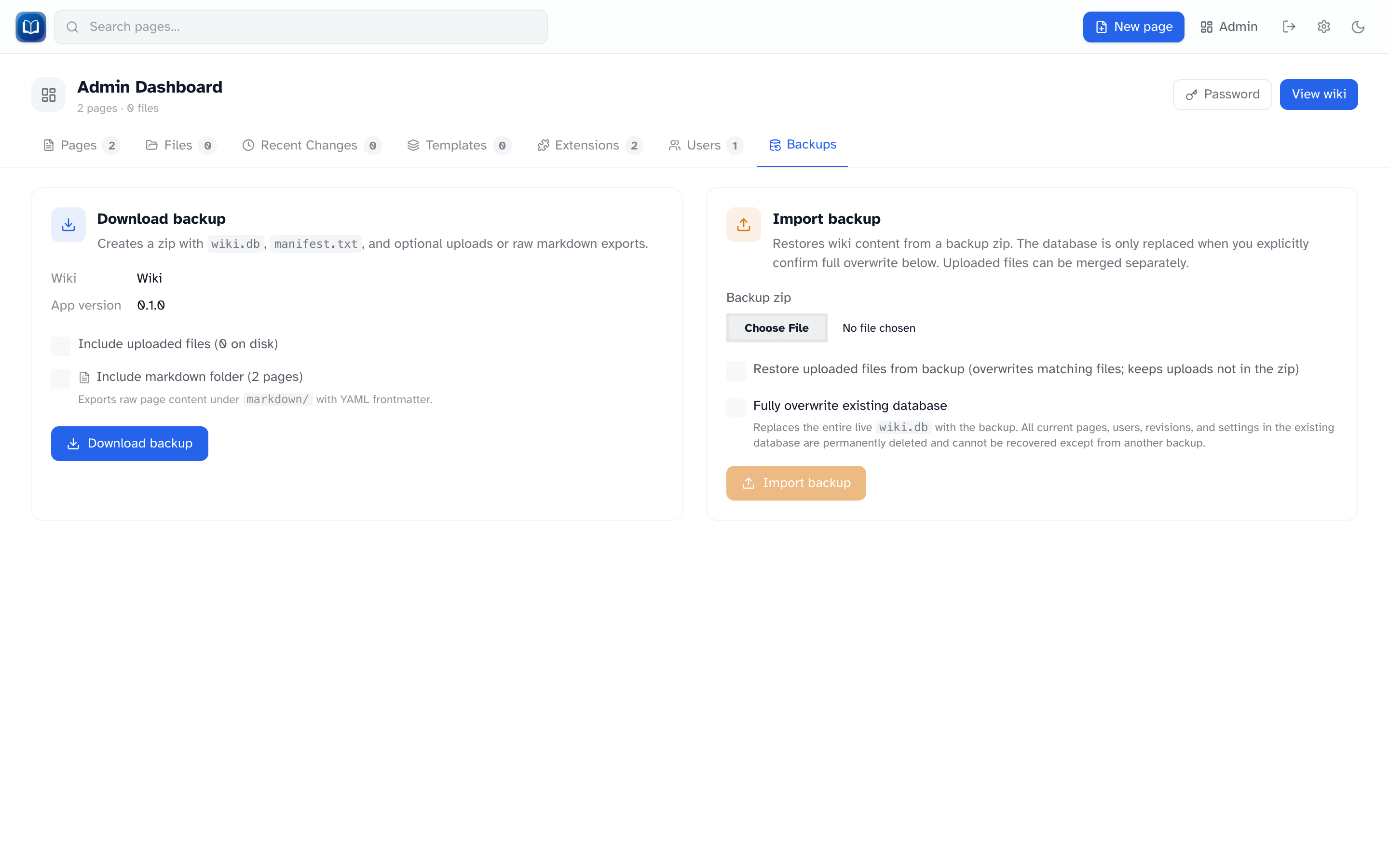 Export and import wiki backups as zip files.
Admin → Backups lets you download a snapshot of the wiki or restore from one.
Export
Click Export backup for a zip containing:
wiki.db— always includedmanifest.txt— wiki name and export date- Uploaded files — optional (the UI warns when that library is large; export loads uploads into memory)
markdown/folder — raw page exports with YAML frontmatter — optional
Keep backups somewhere safe, not just on the same machine as the wiki.
Import
Import replaces your live data. Read the checkboxes carefully.
- Upload a backup zip
- Check Fully overwrite existing database (required)
- Optionally check Restore uploads to merge files from the backup
- Click Import
While the database swaps, other users see a 503 page. It usually takes a few seconds.
If something goes wrong, the import rolls back automatically.
Upload merge
| Situation | What happens |
|---|---|
| File in backup, already on disk | Overwritten |
| File in backup, not on disk | Added |
| File on disk, not in backup | Kept — not deleted |
When to back up
- Before importing a backup
- Before bulk edits or upgrades
- Regularly, if people edit the wiki often
Tips
- Include uploads if your wiki has lots of images
- The markdown export is handy for reading content outside the wiki
- Test a restore on a copy before relying on a backup in production